Docs · Verify guide
DOCS · VERIFY GUIDE
How Perp Brain data is made, and how to check it yourself
A guide for people who aren't developers. Last updated 16 Nov 2026. Also available as a PDF.
Perp Brain is a free, open-source toolkit from GVNR DAO LLC for Hyperliquid perpetual futures. It reads public market and account data, works out what a trade would cost before it happens, and writes the result into a receipt. A receipt is a small set of files that anyone can check again, without trusting us.
Perp Brain never holds keys, signs anything or moves money. Simulated results are labelled SIMULATED. Testnet results are labelled TESTNET. Nothing here is financial advice or a promise of returns. Read the risk disclosure: perpbrain.com/legal/risk-disclosure
1. How a receipt is made
- Collect the inputs. Perp Brain reads public data from Hyperliquid, for example the order book, recent price bars and funding rates, or an account's funding payments. It saves the raw data exactly as it was read, in
inputs.json. - Do the calculation. For a trade simulation it walks the real order book to price the fill, adds Hyperliquid's fees and the funding over the holding time, and checks the result against the owner's limits. For a funding reconciliation it adds up the venue's funding rows and compares them with what the vault booked.
- Fingerprint everything. Each input and result is run through SHA-256, a standard fingerprint. Change one character and the fingerprint changes completely.
- Write the receipt. The fingerprints and the result go into
receipt.json. A simulation receipt also gets amanifest.jsonthat lists the fingerprints in one place.
Re-checking a receipt repeats steps 2 and 3 from the saved inputs. If anything was changed, the fingerprints no longer match.
2. What's in a receipt
| Field | What it means |
|---|---|
kind | The type: perpbrain.sim-receipt (trade simulation) or perpbrain.funding-recon-receipt (funding check). |
label | SIMULATED for a simulation; TESTNET or MAINNET for a funding check, depending on where the data came from. |
inputs / inputs.json | The raw data the result was calculated from. |
data_snapshot_id / inputs_sha256 | The fingerprint of the inputs. |
limits and limits_hash | The owner's limits (leverage, size, slippage, daily loss) and their fingerprint. Simulations only. |
market_snapshot_id | The fingerprint of the market details used (for example each coin's maximum leverage). Simulations only. |
result | The calculated answer: fills, prices, fees, slippage and funding, or the funding windows. |
result_sha256 | The fingerprint of the result. |
manifest_sha256 | The fingerprint of manifest.json. Simulations only. |
statement | Always verified and reproducible: anyone can rerun it from the same inputs. |
3. Check a receipt on perpbrain.com/verify
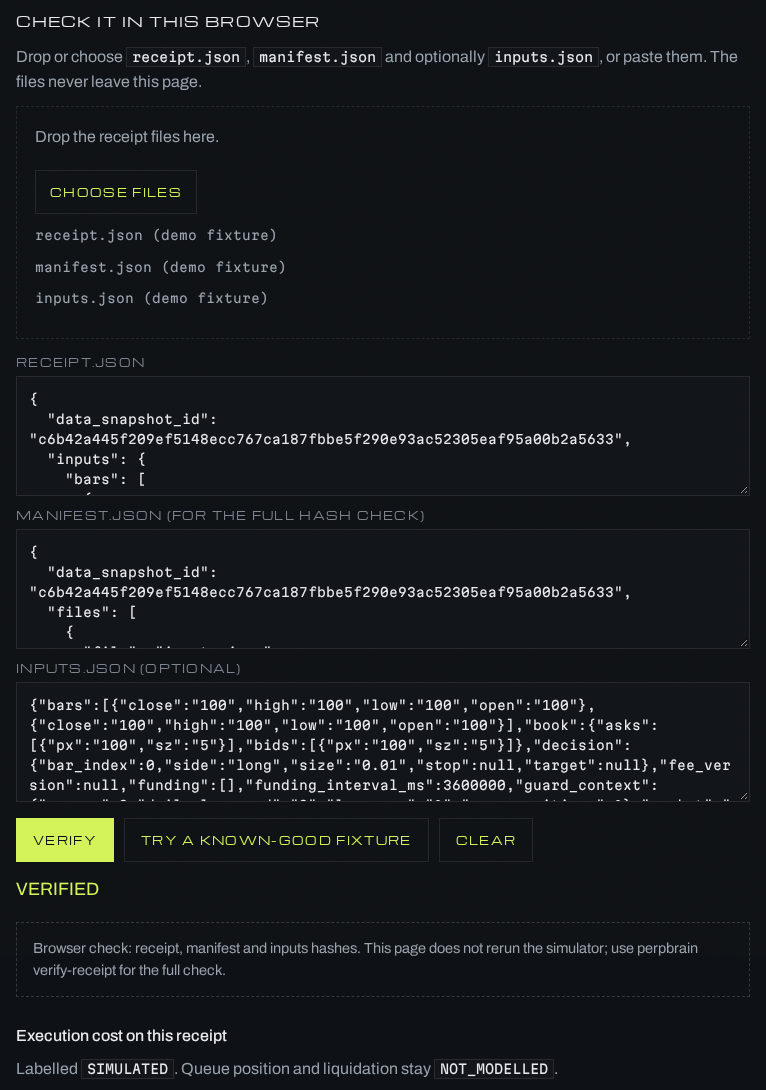
You need a web browser and nothing else. The check runs inside your browser: the files are not uploaded.
- Open perpbrain.com/verify/.
- To try it first, click Try a known-good fixture. This loads a sample receipt labelled SIMULATED and checks it. You should see VERIFIED.
- To check your own receipt, click Choose files (or drag the files onto the page) and pick
receipt.json,manifest.jsonand, if you have it,inputs.json. You can also paste the text of each file into its box. - Click Verify.
- Read the result:
- VERIFIED means every fingerprint matches the files you gave.
- MISMATCH lists each part that doesn't match, for example
manifest_sha256 mismatch.
- When a simulation receipt verifies, the page also shows its cost breakdown: fees, slippage and funding.
The browser check confirms the fingerprints. It doesn't rerun the simulator. For the full check, use the command line (section 4) or ask someone technical to run it for you.
4. Check a receipt from the command line
This reruns the whole calculation. It needs Python 3.11 or newer, and no account, key or wallet.
pip install perpbrain
perpbrain verify-receipt path/to/receipt.jsonIt prints VERIFIED, or MISMATCH followed by every field that differs.
With Node.js 22 or newer, the TypeScript SDK does the same check:
npm install @perpbrain/sdkthen, in code, verifyReceiptAt("path/to/receipt-folder") returns { status, mismatches }.
A funding reconciliation receipt is checked with the Python package:
python -c "import json,sys; from perpbrain_read.sim.funding_recon import verify_recon_receipt as v; print(v(json.load(open('receipt.json')), open('inputs.json','rb').read()))"It prints {'status': 'VERIFIED', 'mismatches': []} when the receipt matches its inputs.
5. What the results mean
| Result | Meaning | What to do |
|---|---|---|
| VERIFIED | The receipt was calculated from exactly these inputs, and nothing was changed afterwards. | Nothing. Keep the files with your records. |
| MISMATCH | At least one fingerprint or result differs. The list says which. | Ask the sender for the original files. A pasted file that lost characters, or a changed number, both show up here. |
| MATCH / DIFF (funding receipts) | For each funding window: the vault's booked amount agrees with Hyperliquid's own funding rows within the tolerance (MATCH), or it doesn't (DIFF). | DIFF windows need a look from the vault operator. |
| RECONCILED / DIFFERENCES (funding receipts) | The whole period: every window matched, or at least one didn't. |
A VERIFIED receipt shows the numbers came from those inputs. It doesn't show that a strategy will make money, and simulated costs can differ from real ones.
6. Two kinds of receipts you may see
Smooth Brains: shadow simulation receipts
Smooth Brains runs Perp Brain in shadow mode. When its strategy produces a signal, Perp Brain prices that trade on the live order book and writes a SIMULATED receipt (perpbrain.sim-receipt). Shadow mode records; it doesn't block or place orders. Each receipt has receipt.json, manifest.json and inputs.json, and is checked on perpbrain.com/verify or with perpbrain verify-receipt.
From Perp Brain 0.1.4, a simulation receipt can be linked to the real fills on Hyperliquid by order ID or fill hash. The link is a separate file, so the original receipt never changes. It records the real average price, the slippage against the simulated price, the fee difference and the time between decision and fill.
Diamond Hands Carry: funding reconciliation receipts
Diamond Hands Carry holds a BTC short on Hyperliquid that earns or pays funding. Its vault books the funding it measures on-chain. Perp Brain reads Hyperliquid's own funding record for the same account and compares the two, window by window, in a funding reconciliation receipt (perpbrain.funding-recon-receipt).
- It is labelled
TESTNETorMAINNET, neverSIMULATED, because it uses recorded data, not a simulation. - Each window is MATCH or DIFF; the whole receipt is RECONCILED or DIFFERENCES.
- It has
receipt.jsonandinputs.json(no manifest) and is checked with the Python command in section 4. - The live example is at perpbrain.com/case-studies/diamond-hands/ with its files.
It checks Hyperliquid's half of the vault: the BTC vaults and the USDC bridge rely on Diamond Hands' own checks.
Questions
Email [email protected]. Perp Brain is operated by GVNR DAO LLC, Marshall Islands.